Display HTML email in windows application
We have a special Windows control to do this – MailBrowserControl.
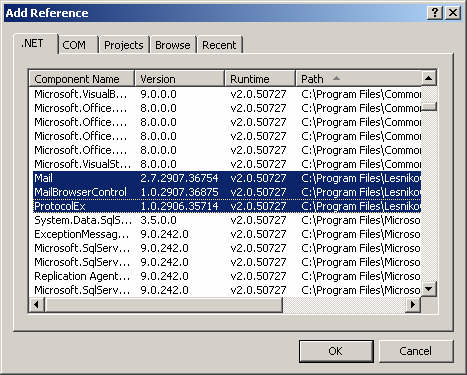
First you need to add reference to the three assemblies:
- Mail.dll
- MailBrowserControl.dll
- ProtocolEx.dll
Add MailBrowserControl to the Toolbox:
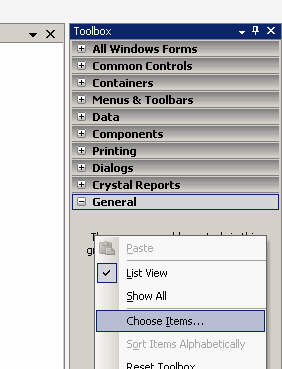

Drag and drop the control on to the form.
Then just use Navigate method:
// C# version

private void button1_Click(object sender, EventArgs e)
{
    IMail mail = new MailBuilder().CreateFromEmlFile(@"HTMLMail.eml");
    mailBrowser1.Navigate(new MailHtmlDataProvider(mail));
}
' VB.NET version

Private Sub button1_Click(sender As Object, e As EventArgs) Handles Button1.Click
	Dim mail As IMail = New MailBuilder().CreateFromEmlFile("HTMLMail.eml")
	mailBrowser1.Navigate(New MailHtmlDataProvider(mail))
End Sub
That’s it!
Note that all images and HTML are loaded from memory, no temporary files are created.
You can find a working example in the Mail.dll download package.

May 8th, 2015 at 09:10
hello, when i run the application after importing » ProtocolEx.dll am getting the error
Mixed mode assembly is build against version ‘v2.0.50727’ of the runtime and cannot be loaded in the 4.0 runtime without additional configuration information.
can you help me?
May 9th, 2015 at 07:27
@Stelios
Please include the following line in your app.config file:
September 9th, 2015 at 14:38
Hi. I bought your DLL yesterday, and I need to show an EML content in a web site (ASP.NET).
I would need something like this control, but for HTML.
Do you provide a way to do this?
Maybe some method that returns an html and handles the embed images (showing the embed images is the most important thing for me).
Thank you in advance.
Leandro.
September 12th, 2015 at 05:34
@Leandro
Mail.dll does not contain ASP.NET control for that purpose.
You can however use IMail.SaveHtmlAs(string path)
This method saves HTML version of the message as regular HTML file,
also saves all visual elements as files to the same folder,
finally it also changes html content of the file, so it references the
files saved on disk.
May 1st, 2016 at 13:31
I was wondering if there is an event for this control so that rather then the mailbrowser control opening links, that my program can do it instead.
Also, is there a way to know how wide the email being rendered is so that the control can be sized to fit it?
May 5th, 2016 at 10:50
@Scott
MailBrowserControl control inherits from standard .NET WebBrowser control.
It exposes same events. You can use Navigating event:
mailBrowserControl.Navigating += (object sender, WebBrowserNavigatingEventArgs e) =>
                                    {
                                        string url = e.Url.ToString();
                                        e.Cancel = true;
                                    };
> is there a way to know how wide the email being rendered
I don’t think this is possible.
July 20th, 2016 at 13:08
Most email programs prevent images from being downloaded and displayed – is there any way of doing this using MailBrowserControl?
July 22nd, 2016 at 15:05
@Daryl
MailBorwserControl inherits from WebBrowser class, if you can do this with WebBrowser it is also possible using MailBorwserControl.