Email template engine
Newest version of Mail.dll email library for .NET includes easy to use template engine.
It allows you to easily create html template for your emails:
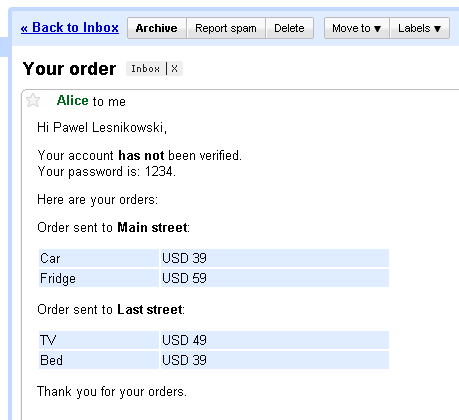
Loading and rendering such template requires one line of code:
// C# version

Contact templateData = ...;

 string html = Template
     .FromFile("template.txt")
     .DataFrom(templateData )
     .Render();
' VB.NET version

Dim templateData As Contact = ....

Dim html As String = Template _
     .FromFile("template.txt") _
     .DataFrom(templateData) _
     .Render()
This is how the template looks like:
<html>
<head>
    <title>Your order</title>
</head>
<body>
	Hi [FirstName] [LastName],
	<br />
	<p>
	Your account [if Verified]has[else]<strong>has not</strong>[end] been verified. <br/>
	Your password is: [Password].
	</p>
	<p>
	Here are your orders:
	</p>
	[foreach Orders]
		<p>
		Order sent to <strong>[Street]</strong>:
		</p>
		<table style="width: 30%;">
			[foreach Items]
				<tr style="background-color: #E0ECFF;">
					<td>[Name]</td><td>[Price]</td>
				</tr>
			[end]
		</table>
	[end]
	<p>
		Thank you for your orders.
	<p>
</body>
</html>
Here’s the sample code that loads, fills the template and sends it using Mail.dll:
// C# version

string rendered = Template
    .FromFile("template.txt")
    .DataFrom(templateData)
    .Render();

MailBuilder builder = new MailBuilder();
builder.Html = rendered;
builder.Subject = "Your order";
builder.From.Add(new MailBox("alice@mail.com", "Alice"));
builder.To.Add(new MailBox("bob@mail.com", "Bob"));
IMail email = builder.Create();

using (Smtp client = new Smtp())
{
    client.ConnectSSL("smtp.example.org");
    client.UseBestLogin("alice@example.org", "password");
    client.SendMessage(email);
    client.Close();
}
// C# fluent interface version

using Fluent = Limilabs.Mail.Fluent;

Fluent.Mail.Html(Template
              .FromFile("template.txt")
              .DataFrom(templateData)
              .Render())
    .From(new MailBox("alice@mail.com", "Alice"))
    .To(new MailBox("bob@mail.com", "Bob"))
    .Subject("Your order")
    .UsingNewSmtp()
    .WithCredentials("alice@example.org", "password")
    .Server("smtp.example.org")
    .WithSSL()
    .Send();
' VB.NET version

    Dim rendered As String = Template _
        .FromFile("template.txt") _
        .DataFrom(templateData) _
        .Render()

    Dim builder As MailBuilder = New MailBuilder()
    builder.Html = rendered
    builder.Subject = "Your order"
    builder.From.Add(New MailBox("alice@mail.com", "Alice"))
    builder.[To].Add(New MailBox("bob@mail.com", "Bob"))
    Dim email As IMail = builder.Create()

    Using client As Smtp = New Smtp()
        client.ConnectSSL("smtp.example.org")
        client.UseBestLogin("alice@example.org", "password")
        client.SendMessage(email)
        client.Close()
    End Using
' VB.NET fluent interface version

Imports Fluent = Limilabs.Mail.Fluent;

Fluent.Mail.Html(Template _
               .FromFile("template.txt") _
               .DataFrom(templateData) _
               .Render()) _
     .From(New MailBox("alice@mail.com", "Alice")) _
     .[To](New MailBox("bob@mail.com", "Bob")) _
     .Subject("Your order") _
     .UsingNewSmtp() _
     .WithCredentials("alice@example.org", "password") _
     .Server("smtp.example.org") _
     .WithSSL() _
     .Send()
You can also specify text version of the message, by using Text(string) method. In most cases this is unnecessary, as Mail.dll automatically extracts plain text from html and adds the plain text version to the email message.
And this is how the data (templateData variable), used by the template, look like:
// C# version

public class Contact
{
    public List<order> Orders { get; private set; }

    public string FirstName { get; set; }
    public string LastName { get; set; }
    public bool Verified;
    private string Password { get; set; }

    public Contact()
    {
        Orders = new List<order>();
    }
} ;
' VB.NET version

Public Class Contact
	Public Property Orders() As List(Of Order)
		Get
			Return m_Orders
		End Get
		Private Set
			m_Orders = Value
		End Set
	End Property
	Private m_Orders As List(Of Order)

	Public Property FirstName() As String
		Get
			Return m_FirstName
		End Get
		Set
			m_FirstName = Value
		End Set
	End Property
	Private m_FirstName As String
	Public Property LastName() As String
		Get
			Return m_LastName
		End Get
		Set
			m_LastName = Value
		End Set
	End Property
	Private m_LastName As String
	Public Verified As Boolean
	Private Property Password() As String
		Get
			Return m_Password
		End Get
		Set
			m_Password = Value
		End Set
	End Property
	Private m_Password As String

	Public Sub New()
		Orders = New List(Of Order)()
	End Sub
End Class
July 22nd, 2014 at 06:40
This is a very usefull thing and easy to implement thanks to your tutorial! Great job.
May 24th, 2015 at 09:56
I tried using DataFrom with a Dictionary but it doesn’t work. Would be nice to have
May 24th, 2015 at 10:47
@Martin
You can use Template.AddKey method:
string s = Template
    .Create("Show some number [key].")
    .AddKey("key", "42")
    .Render();
I’ve already implemented this feature, and it’ll be added in the next release.
December 7th, 2015 at 14:41
[…] Also take a look at Mail.dll’s templating engine […]
August 16th, 2017 at 23:45
How would an html template look if I needed a logo image (jpg or png) in the signature part of the email ?
August 18th, 2017 at 10:34
@Martin,
Your HTML must include img tag with src attribute set to content-id of the attached image:
Also you need to add this image to Visuals collection:
Using fluent interface:
IMail email = Fluent.Mail
    .Html(@"<img src=""cid:logo@example.com"" />")
    .AddVisual(@"c:\image.jpg")
    .SetContentId("logo@example.com")
    .Create();
You can find more details here:
https://www.limilabs.com/blog/send-html-email