I have problems issuing IMAP, POP3 or SMTP command
Mail.dll is a rock solid product, however most email servers don’t follow RFC specifications rigorously. In the following few steps we’ll help you gather the information we need to make Mail.dll IMAP and POP3 clients better.
If you have problems parsing a message please go here.
Prerequisites
First please check if you have the latest version installed. You can always download the latest version of Mail.dll email component and release notes here.
Identify command
Please identify the command/set of commands that cause problems.
Turn on logging
Enable logging for Mail.dll clients:
// C# version:

Log.Enabled = true;
' VB.NET version:

Log.Enabled = True
You can observe standard Visual Studio’s trace output window (View/Output/Show output from: Debug) or add a custom listener to Trace.Listeners collection.
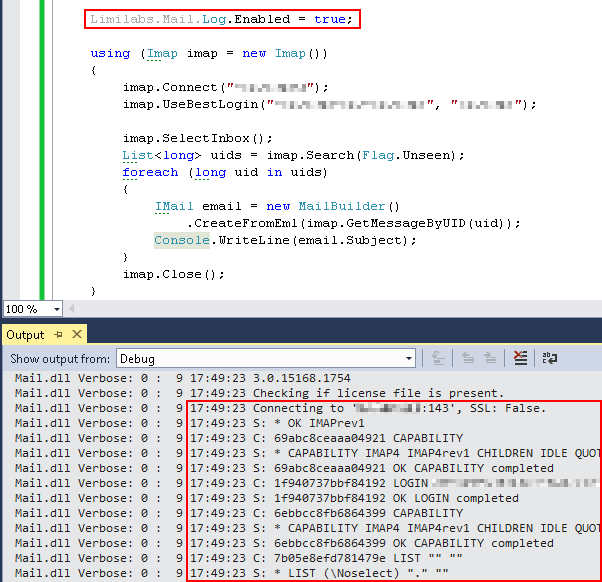
You can also enable logging using App.config file:
<?xml version="1.0" encoding="utf-8" ?>
<configuration>
    <system.diagnostics>
      <switches>
        <add name="Mail.dll" value="True" />
      </switches>
    </system.diagnostics>
</configuration>
log4net
If you are using the latest version of log4net.dll, Mail.dll is going to use log4net instead of Trace class. Please refer to log4net manual on how to capture log entries.
Please remember that even when using log4net, you need to enable logging by setting “Limilabs.Mail.Log.Enabled = True” or be setting Mail.dll boolean switch in App.config file.
Log to file
You can create your custom TraceListener that writes log to file:
// C# version:

internal class MyListener : TextWriterTraceListener
{
    public MyListener(string fileName)
        : base(fileName)
    {
    }

    public override void Write(string message, string category)
    {
        if (category == "Mail.dll")
            base.Write(message, category);
    }

    public override void WriteLine(string message, string category)
    {
        if (category == "Mail.dll")
            base.WriteLine(message, category);
    }
}
' VB.NET version

Friend Class MyListener
	Inherits TextWriterTraceListener
	Public Sub New(fileName As String)
		MyBase.New(fileName)
	End Sub

	Public Overrides Sub Write(message As String, category As String)
		If category = "Mail.dll" Then
			MyBase.Write(message, category)
		End If
	End Sub

	Public Overrides Sub WriteLine(message As String, category As String)
		If category = "Mail.dll" Then
			MyBase.WriteLine(message, category)
		End If
	End Sub
End Class
…then add it to Listeners collection:
// C# version:

Log.Enabled = true;
Trace.Listeners.Add(new MyListener(@"c:/mail_log.txt"));
Trace.AutoFlush = true;
' VB.NET version:

Log.Enabled = True
Trace.Listeners.Add(New MyListener("c:/mail_log.txt"))
Trace.AutoFlush = True
Log.WriteLine
Log class exposes WriteLine event. You can use that event to subscribe your own logging library:
// C#

Log.WriteLine += Console.WriteLine;
' VB.NET

Log.WriteLine += Console.WriteLine
Reproduce the problem
Perform the operations that cause problems, and save the log to file.
You can remove username and password, but please do not modify the file extensively. If you do, it may be impossible to reproduce the issue.
In particular do not change new line format nor encoding.
Additional information
Please answer following questions:
- What exception are you getting?
- What is the exception stack trace?
- What is the exception message?
- What result you expect?
- What result are you getting?
- Which .NET Framework version are you using?
- Is it console, windows forms, windows service or web application?
- If it is possible please attach the source code you are using
Contact Limilabs support
Finally please zip the log file and send it as an attachment, along with all the answers to: .
February 23rd, 2015 at 15:34
[…] « Send iCalendar recurring meeting requests I have problems issuing IMAP, POP3 or SMTP command […]