Send iCalendar recurring meeting requests
First add all necessary namespaces:
// C# version

using System;
using Limilabs.Mail;
using Limilabs.Mail.Appointments;
using Limilabs.Mail.Headers;
using Fluent = Limilabs.Mail.Fluent;
using Limilabs.Client.SMTP;
' VB.NET version

Imports System;
Imports Limilabs.Mail;
Imports Limilabs.Mail.Appointments;
Imports Limilabs.Mail.Headers;
Imports Fluent = Limilabs.Mail.Fluent;
Imports Limilabs.Client.SMTP;
Now, we’ll create an appointment, specify it’s recurring options and send it:
// C# version

Appointment appointment = new Appointment();
Event newEvent = appointment.AddEvent();
newEvent.SetOrganizer(new Person("Alice", "alice@example.org"));
newEvent.AddParticipant(new Participant("Bob", "bob@gmail.com"));
newEvent.Description = "We need to talk about the daily report";
newEvent.Summary = "Daily report meeting";
newEvent.Start = new DateTime(2010, 11, 29, 16, 0, 0);
newEvent.End = new DateTime(2010, 11, 29, 17, 0, 0);
newEvent.Priority = 5;
newEvent.Class = EventClass.Public;

RecurringRule rule = newEvent.AddRecurringRule();
rule.Interval = 1;
rule.Until = new DateTime(2011, 12, 1); // -or- rule.Count = 10;

// Every week on  Mon, Tue, Wed, Thu Fri:
rule.Frequency = Frequency.Weekly;
rule.ByDay.AddRange(new[] {
    Weekday.Monday,
    Weekday.Tuesday,
    Weekday.Wednesday,
    Weekday.Thursday,
    Weekday.Friday });

Alarm alarm = newEvent.AddAlarm();
alarm.Description = "Reminder";
alarm.BeforeStart(TimeSpan.FromMinutes(5));

IMail email = Fluent.Mail.Text("Daily report meeting at 4PM")
    .Subject("Daily report meeting")
    .From(new MailBox("alice@example.org", "Alice"))
    .To(new MailBox("bob@example.org", "Bob"))
    .AddAppointment(appointment)
    .Create();

using (Smtp client = new Smtp())
{
    client.ConnectSSL("smtp.example.org");
    client.UseBestLogin("user", "password");
    client.SendMessage(email);
    client.Close();
}
' VB.NET version

Dim appointment As New Appointment()
Dim newEvent As [Event] = appointment.AddEvent()
newEvent.SetOrganizer(New Person("Alice", "alice@example.org"))
newEvent.AddParticipant(New Participant("Bob", "bob@gmail.com"))
newEvent.Description = "We need to talk about the daily report"
newEvent.Summary = "Daily report meeting"
newEvent.Start = New DateTime(2010, 11, 29, 16, 0, 0)
newEvent.[End] = New DateTime(2010, 11, 29, 17, 0, 0)
newEvent.Priority = 5
newEvent.[Class] = EventClass.[Public]

Dim rule As RecurringRule = newEvent.AddRecurringRule()
rule.Interval = 1
rule.Until = New DateTime(2011, 12, 1)
' -or- rule.Count = 10;
' Every week on  Mon, Tue, Wed, Thu Fri:
rule.Frequency = Frequency.Weekly
rule.ByDay.AddRange(New Weekday() {Weekday.Monday _
                                   , Weekday.Tuesday _
                                   , Weekday.Wednesday _
                                   , Weekday.Thursday _
                                   , Weekday.Friday})

Dim alarm As Alarm = newEvent.AddAlarm()
alarm.Description = "Reminder"
alarm.BeforeStart(TimeSpan.FromMinutes(5))

Dim email As IMail = Fluent.Mail.Text("Daily report meeting at 4PM") _
    .Subject("Daily report meeting") _
    .From(New MailBox("alice@example.org", "Alice")) _
    .[To](New MailBox("bob@example.org", "Bob")) _
    .AddAppointment(appointment).Create()

Using client As New Smtp()
    client.ConnectSSL("smtp.example.org")
    client.UseBestLogin("user", "password")
    client.SendMessage(email)
    client.Close()
End Using
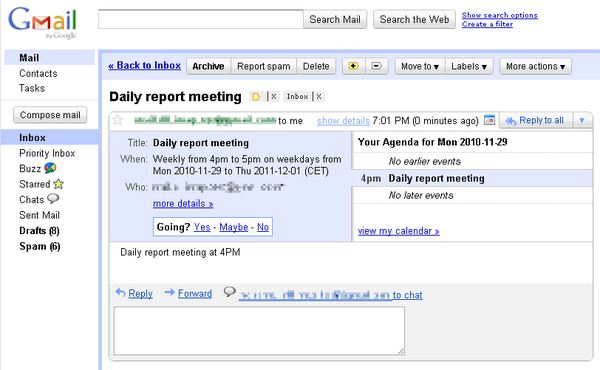
This is how it looks like in Gmail:
Recurring meeting frequency
Here are the few samples of how you can set the frequency:
Daily:
// C# version

rule.Frequency = Frequency.Daily;
' VB.NET version

rule.Frequency = Frequency.Daily
Every month on last monday:
// C# version

rule.Frequency = Frequency.Monthly;
rule.ByDay.Add(Weekday.LastMonday);
' VB.NET version

rule.Frequency = Frequency.Monthly
rule.ByDay.Add(Weekday.LastMonday)
Every month on second but last monday:
// C# version

rule.Frequency = Frequency.Monthly;
rule.ByDay.Add(new Weekday(-2, Weekday.Monday));
' VB.NET version

rule.Frequency = Frequency.Monthly
rule.ByDay.Add(New Weekday(-2, Weekday.Monday))